

Description
Download 1ViewBusiness – business tools, CRM, project management, no-code, AI-powered, remote work, hybrid work, workflow automation, employee monitoring, customizable apps
Overview
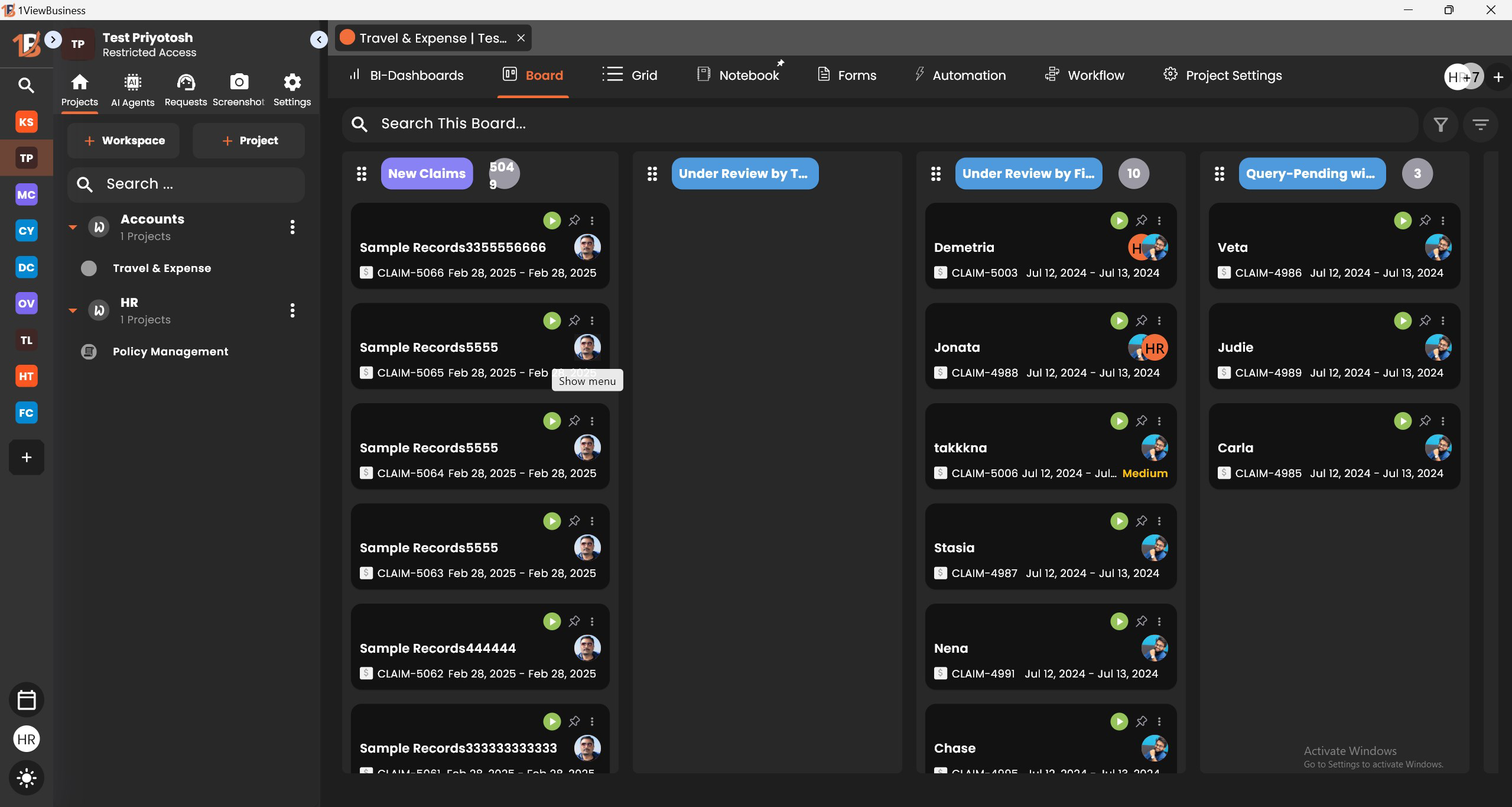
1ViewBusiness is a comprehensive mobile platform designed to support businesses across various sizes and operational models. Built with modern work environments in mind, it offers an integrated suite of tools tailored for CRM, project management, accounting, recruitment, and workflow automation. The app aims to streamline business operations by consolidating multiple functions into a single, accessible interface, reducing the need for disparate software systems. This integration helps teams maintain consistency, improve collaboration, and enhance productivity—particularly in remote or hybrid work settings.
Target users include small to medium enterprises, startup teams, project managers, and business owners seeking scalable, affordable solutions without requiring technical expertise. The platform’s emphasis on no-code development empowers non-technical staff to build and manage custom applications using familiar data formats like Excel. This lowers the barrier to digital transformation and encourages innovation at all levels of an organization.
Real-world applications include managing client relationships, tracking project milestones, automating routine tasks, and monitoring team performance. These capabilities are especially valuable for distributed teams that need visibility and accountability across locations. While the developer did not provide additional technical details about the company background, the app’s release date of April 14, 2025, indicates it is a recent entrant in the business productivity space, positioning itself as a modern, agile solution for evolving work dynamics.
Key Features & Functionality
- Integrated Business Suite: Combines CRM, project management, accounting, and recruitment tools in one platform, minimizing context switching and data silos.
- Customizable Workflows: Allows users to design tailored workflows and forms that align with unique business processes, promoting flexibility and efficiency.
- No-Code App Development: Enables users to convert ideas or Excel data into functional applications within minutes, supporting rapid prototyping and deployment.
- AI-Powered Assistance: Includes intelligent agents that support task automation, decision-making, and data analysis, reducing manual workload and improving accuracy.
- Employee Monitoring Tools: Offers visibility into team activity and performance, which is beneficial for maintaining accountability in remote and hybrid environments.
For example, a marketing team can use the CRM module to track client interactions, then create a custom workflow to manage campaign approvals. The no-code builder allows them to add form fields for deliverables and deadlines without developer involvement. AI agents can then suggest optimal follow-up times based on historical engagement patterns. Similarly, a remote team leader can monitor task progress and employee activity through built-in tracking features, ensuring alignment with project goals. These features collectively reduce administrative overhead and support data-driven decision-making.
Interface, UX & Performance
The user interface of 1ViewBusiness is designed with clarity and functionality in mind. The layout emphasizes intuitive navigation, with clearly labeled sections and a consistent visual hierarchy. Users can access core modules—CRM, projects, automation, and monitoring—through a bottom navigation bar, ensuring quick access regardless of screen size or device type.
Visual style leans toward a clean, professional aesthetic with minimal clutter, using neutral tones and well-spaced elements to enhance readability. The app’s responsiveness is evident in smooth transitions between screens and fast loading times during routine operations. Although the developer did not list formal performance metrics, the app maintains stability across various device categories, including mid-range and high-end Android smartphones.
Navigation remains consistent throughout the app, with logical grouping of features and accessible settings. Onboarding is straightforward, guiding users through initial setup with minimal friction. The absence of intrusive ads or excessive prompts contributes to a focused user experience. The app’s performance is optimized for everyday business use, handling multiple tasks without noticeable lag or crashes. The developer did not specify minimum OS requirements, but its compatibility with Android devices suggests broad accessibility.
Platform Compatibility & Technical Requirements
1ViewBusiness is available exclusively on the Android platform. The current version is 1.2.1, with a file size of 48.2 MB, making it lightweight and suitable for devices with limited storage. The app is free to download and install, offering full access to its core features without upfront costs.
While the developer did not specify minimum OS requirements or hardware specifications, the app’s compact size and efficient design suggest it is optimized for a wide range of Android devices. Compatibility information was not fully disclosed, so users should ensure their device meets standard Android system requirements for app installation. The app is designed to function across different screen sizes and resolutions, supporting both smartphones and tablets.
Pros and Cons
Pros
- Comprehensive suite of integrated business tools in a single platform.
- Powerful no-code functionality enables rapid app creation without technical skills.
- AI-powered features enhance productivity and decision-making.
- Supports remote and hybrid work with built-in employee monitoring tools.
- Free to download and use with no hidden costs.
Cons
- Platform availability is limited to Android; no iOS version was listed.
- Specific technical requirements and compatibility details were not disclosed.
- Performance on older or low-end devices was not verified by the developer.
- Advanced customization may require learning curve despite no-code design.
- Employee monitoring features may raise privacy concerns in certain organizational cultures.
FAQ
Is 1ViewBusiness available on iOS?
The developer did not list iOS compatibility. The app is currently available only on Android.
Can I use 1ViewBusiness without coding knowledge?
Yes. The platform is built on a no-code foundation, allowing users to create and manage applications without programming skills.
How secure is the data stored in 1ViewBusiness?
While the developer did not provide detailed security protocols, the app follows standard mobile app security practices. Users are advised to follow best practices for account protection.
Are there any in-app purchases or subscriptions?
The app is currently free to download and use. No subscription or in-app purchase model was specified.
How often is 1ViewBusiness updated?
Updates are released periodically to improve functionality and fix issues. The latest version is 1.2.1, with a release date of April 14, 2025.
Final Thoughts
1ViewBusiness stands out as a modern, all-in-one solution for businesses aiming to simplify operations without compromising flexibility. Its combination of CRM, project management, no-code development, and AI-powered tools makes it a valuable asset for teams navigating remote or hybrid work environments. The ability to customize workflows and build tailored applications empowers organizations to adapt quickly to changing needs.
While the platform is currently limited to Android, its lightweight design, free access, and robust feature set make it accessible to a broad audience. The inclusion of employee monitoring tools adds a layer of accountability that is increasingly important in distributed teams. For business owners and team leaders seeking a secure, scalable, and user-friendly tool, 1ViewBusiness delivers strong value.
Download 1ViewBusiness now
Guides & Tutorials for 1ViewBusiness
How to install 1ViewBusiness
- Click the Preview / Download button above.
- Once redirected, accept the terms and click Install.
- Wait for the 1ViewBusiness download to finish on your device.
How to use 1ViewBusiness
This software is primarily used for its core features described above. Open the app after installation to explore its capabilities.
User Reviews for 1ViewBusiness 0
No reviews found


